
Save time. Reduce costs. Grow faster.
We automate the work your team does by hand between systems: orders, stock, jobs, invoices and payroll. One central hub connects them, so each record is entered once and every department works from the same numbers.
Request a free 20-minute callBrisbane based. Built for Australian businesses turning over $1–5 million.
One hub, every system. Orders, stock, accounts and freight share the same record.
361 of 383
invoices matched on the first run at Raw Blend
6 stores, 1 hub
one QuickBooks company, 52 automations
Pay as each stage is approved
On builds over $10,000 you see each stage working before it’s invoiced.
As a business grows, it picks up a system for each job: an online store or order portal, accounting software, a stock spreadsheet, a job or CRM system, a freight account, payroll. Each one works on its own. None of them share information, so your staff fill the gaps by re-typing orders, exporting spreadsheets and checking one screen against another.
A hub sits in the middle. Every system sends its information in, the hub applies your business rules once, and passes the right details to whichever system needs them next.
Nobody re-types it. Sales, the warehouse and accounts all see the same order, the same stock count and the same invoice. The same idea works for a quote that becomes a job, a work order and an invoice.
If a reliable rule can automate something, we use a rule. If two systems need connecting, we integrate them. AI comes in when a document needs understanding, an email needs interpreting or a decision needs context — not everywhere by default.
If two or more of these sound like your office, the systems are costing you staff time every day.
A quote goes into one system, gets re-typed as an order in another, then again as an invoice in your accounting software. With a hub, the quote becomes the order, the work order and the invoice without anyone keying it again.
See how systems connectSales has one stock figure, the warehouse another, and accounts a third. A hub keeps orders, stock and invoices in step, with a dashboard showing today’s figures.
See operations dashboardsA missed invoice or a double payment sits unnoticed until someone reconciles. A hub checks records every time it runs and flags a mismatch the day it happens.
See accounting integrationsEach record is entered once, checked against the other systems and passed to whichever system needs it next. Anything that doesn’t match goes to a person with the reason.
See what a central hub doesMost businesses don't need to replace their software. They need it to share information. The hub is custom software written for your business: it reads from the systems you already pay for, applies your rules, and writes back to them. You own the code.
Systems we have connected
Needs a person
Recent runs
Information comes in from
Custom software, running for your business and owned by you.
And goes out to
| Before | After |
|---|---|
| An order typed into the store, then accounts, then the freight system | Entered once. The hub raises the invoice and sends the order to dispatch. |
| Warehouse staff copying tracking numbers into invoices by hand | Tracking added to the matching invoice when the order ships |
| Supplier price lists recalculated product by product | Your markups applied to the whole file. Unmatched items flagged for review. |
| Sales, warehouse and accounts each keeping their own spreadsheet | Everyone working from the same orders, stock and invoices |
| Errors found when someone reconciles at month end | Records checked on every run. Mismatches flagged straight away. |
Less admin. More business.
Raw Blend · six Shopify stores
Raw Blend sells through six Shopify stores, from blenders to commercial fridges. Its orders, stock, supplier prices and invoices run through one hub we built and still look after.
Blinds and shutters manufacturer
It replaced an old quoting program, MYOB and spreadsheets, and runs the factory every day.
See operations dashboardsJentec Electrical

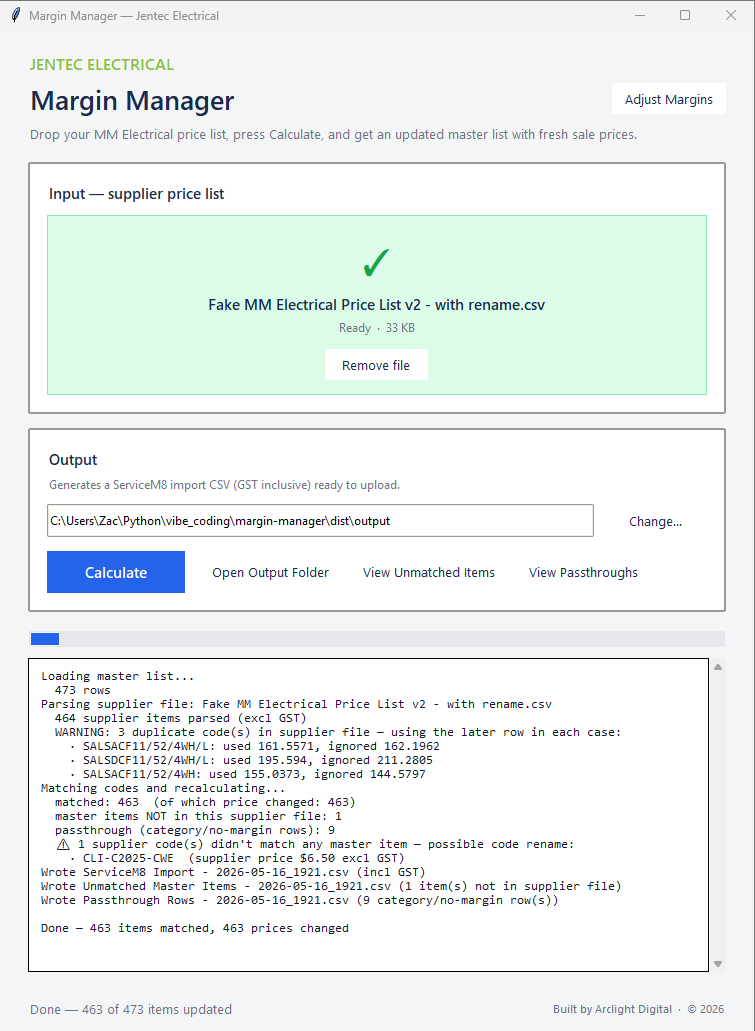
Margin Manager applies stored markups to a supplier price list and produces a ServiceM8-ready file. Unmatched items are flagged.
See how this worksGot a job like this in your business?
Request a free 20-minute callWe agree the scope, delivery schedule and checks before the build. A focused automation and a larger internal system need different plans.
Walk Zac through the task, the tools involved and where time is being lost. We check whether there is a worthwhile fix.
Agree the scope and price. Try the software with representative data and check the exceptions before it goes live.
Get operating notes and help using the system. Review it against the agreed outcome, then decide whether more work is worthwhile.
Every build is priced on its scope and size: how many systems it connects, how many rules it applies, and whether it needs AI agents. You see the scope, the price and the payment stages before any work starts.
If the saving won't justify the price, we say so before you spend anything.
One job across one or two systems, such as adding tracking numbers to invoices or importing a supplier price list.
Two or three systems sharing orders, stock and invoices, with checks between them. Most hubs start here and add departments over time.
Every department connected, with management dashboards, automations and AI agents.
Builds over $10,000 have nothing due up front and no lump sum at the start or the end. They’re split into stages sized to the job, whether that’s two stages or ten. Smaller jobs are a 30% or 50% deposit to start and the remainder on completion.
Builds that use AI agents carry a monthly maintenance fee to keep the agents running. You own the code either way.
Want to know whether your task is worth automating?
Request a free 20-minute callI’m Zac, the Brisbane-based builder behind Arclight AI. I work with business owners to understand the task, build the software and help the team use it.
My work spans a multi-store automation platform for Raw Blend, the system that runs a Brisbane manufacturer from quote to invoice, and pricing tools for trade businesses. You speak with the person building your system through discovery, delivery and support.
The handover explains how the system runs and what another developer needs to maintain it. Where practical, service accounts sit under your business.
We agree what the system can access, which actions need human review and the support arrangements before delivery.
We talk through the repetitive task, the tools involved and what a useful result would look like. Zac then confirms whether discovery or a scoped build is a sensible next step.
It depends on scope and size. A simple automation starts from about $1,000. A hub connecting a few systems is priced on its scope, and most start small and grow. The largest builds, a hub across every department with dashboards and AI agents, can run to $50,000 or more. Builds with AI agents carry a monthly maintenance fee to keep them running. Jobs under $10,000 are a 30% or 50% deposit to start and the remainder on completion. Builds over $10,000 have nothing due up front: they’re split into stages sized to the job, and you pay for each stage once you’ve seen it working and approved it.
Often we can work around it. We check the available APIs, exports, permissions and vendor limitations before agreeing how the systems will connect.
No. Predictable calculations and data transfers often need conventional software. AI can help with less structured inputs such as emails or documents, with review steps where appropriate.
A simple automation can be running in about a week. A multi-system hub can take up to about six months. We agree the delivery schedule once we have reviewed the job and the systems involved.
You receive the code and operating notes, with help using the system. Acceptance checks, fixes within the agreed scope and any ongoing support are set out in the project agreement.
You own the code and receive the configuration and operating notes. Another developer can take over, although they will need time to understand the system and its dependencies.
Most growing businesses run several systems that don't share information. The first step isn't buying more software — it's finding where your team fills the gaps by hand.