Automate the spreadsheet work your team repeats every week.
Turn supplier price lists, recurring calculations and repetitive formatting into software built for your exact files and rules.
A new price list, and the same afternoon lost again.
A supplier sends an updated price list. Someone opens it, finds each product, applies the markup, rounds the result and formats it for the next system.
Next month the columns have moved, a few products have new codes, and it starts again. With a few dozen suppliers, it never really stops.
What we build.
Read the file as it arrives
Excel, CSV, PDF or a supplier portal, whatever layout that supplier uses.
Apply your rules
Markups, rounding, promotional prices and the exceptions only your team knows about.
Check before changing anything
A dry run shows what would change. Changes that look wrong are held back.
Update and keep a way back
Prices update in your store and accounts, with a snapshot so a change can be reverted.
Raw Blend: price lists from 26 suppliers.
The Raw Blend hub processes supplier price lists and stock feeds for 26 suppliers covering about 95 brands, updating costs in QuickBooks and prices across the Shopify stores.
- Big swings are refused. A price list that would move more than 25% of a range by over 10% is not applied.
- Future price lists wait. A list that isn’t in effect yet is refused until it is.
- Changes can be undone. Price, cost and promotion changes are snapshotted so they can be reverted.
- Stock feeds too. Supplier stock files update availability in the stores on a schedule.
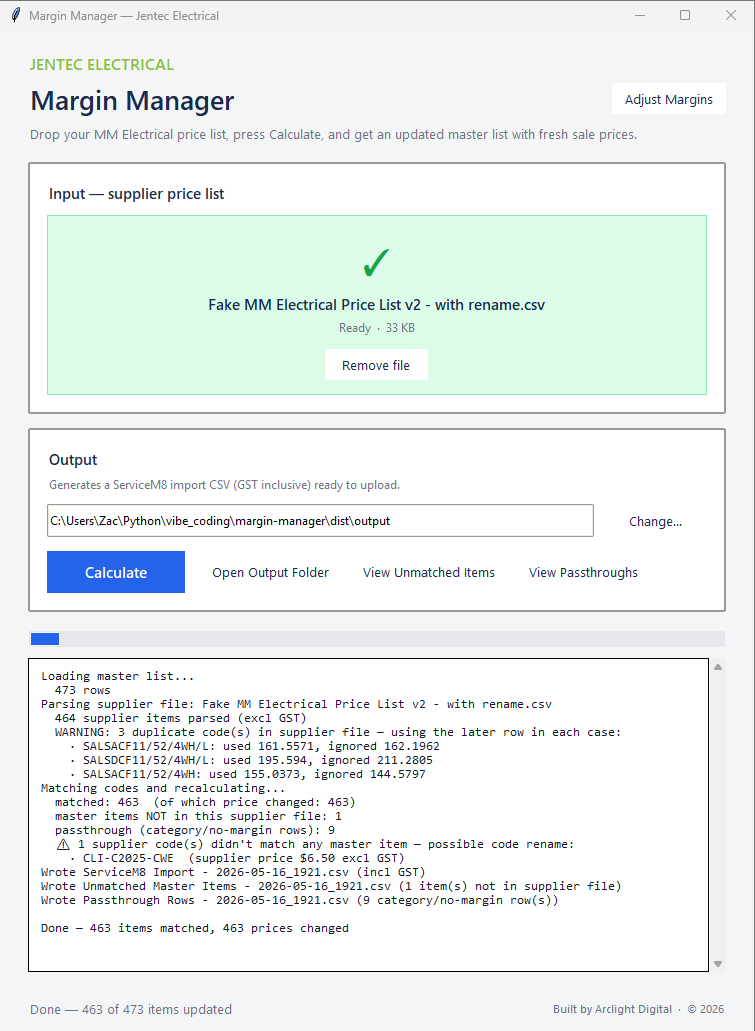
Jentec Electrical: Margin Manager.
Margin Manager applies stored markups to a supplier price list and produces a CSV ready to import into ServiceM8. Unmatched items are shown so the team can check them before importing.
What stays in your control.
- You own it. The code, the credentials and the operating notes stay with your business.
- You decide what runs on its own. We agree which changes happen automatically and which wait for a person to approve.
- You pay as the work is proven. Jobs under $10,000 are a 30% or 50% deposit and the remainder on completion. Larger builds have nothing up front and are paid stage by stage, each after you’ve approved it.
- The price is agreed first. You see the scope and price before any work starts, and every run is logged once it’s live.
What it costs.
A single automation starts from about $1,000 and can be running in about a week. A hub connecting a few systems is priced on its scope. The largest builds, across every department, can run to $50,000 or more over several months.
Jobs under $10,000 are a 30% or 50% deposit to start and the remainder on completion. Builds over $10,000 have nothing due up front: they’re split into stages sized to the job, whether that’s two or ten, and each stage is paid once you’ve seen it working and approved it.
Questions we get asked.
What happens when a supplier changes their file?
We build the reader around each supplier’s format and check for missing or unexpected columns, so a changed file is flagged instead of imported.
Do we have to use a particular spreadsheet layout?
No. The software works with the files your suppliers already send.
Can staff still upload files by hand?
Yes. Many suppliers only email a file, so uploading one is a normal part of the process.
Tell us about your systems.
Request a free 20-minute call. Zac will email you within one business day to arrange a time.
Request a free 20-minute call